
Skip to content
Saul.
Message me on WhatsApp

Web design & development

Hi, I'm Saul.I design and build websites that look as good as your business.

Frontend, backend and UX/UI design in one person: 4+ years of building and ready for the next challenge.

Portrait of Saul
AI toolsClaude · Antigravity · Google Flow
LocationPuebla, Mexico
StackAstro · React · Prisma

Stack

The tools I build with

A few well-chosen tools to design and build every project.

Does your project need any of this?

Message me on WhatsApp(opens in a new tab)

Projects

Selected work

Real projects: the problem, what I did and the result.

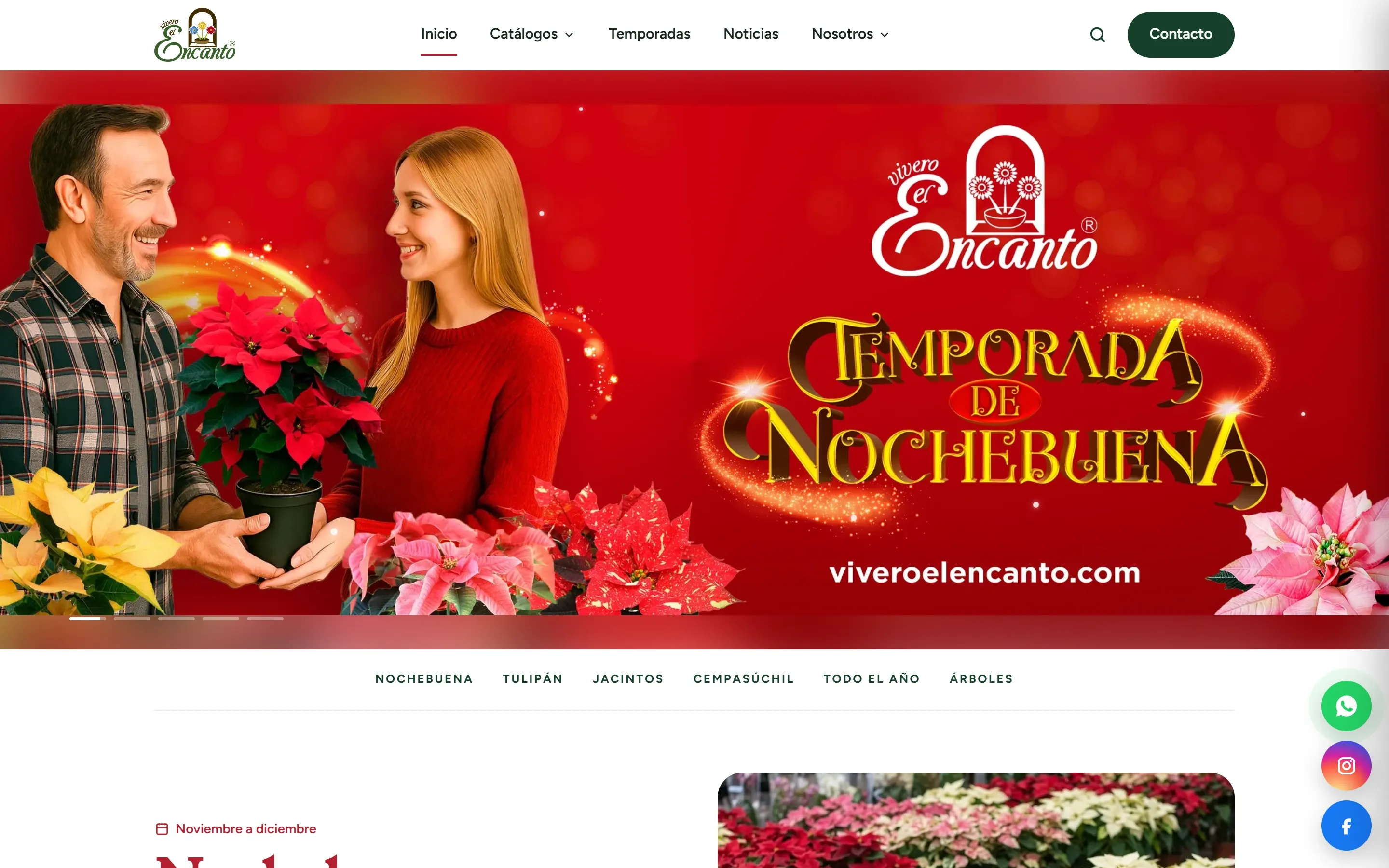
  • Project screenshot: Vivero El Encanto

    Vivero El Encanto

    An online catalog that already brings new customers to the nursery, and that the business updates itself without touching code.

    My role: UX/UI design, base design in Figma, frontend, SEO, GEO, security and photo editing.

    “What I value most is the admin panel: I can update the site myself without knowing anything about programming.”
    — Client, Vivero El Encanto · Translated from the original in Spanish.
    • Figma
    • UX/UI
    • Astro
    • TypeScript
    • CSS
    • SEO
    • GEO
    • Node.js
    • MySQL
    Live siteVivero El Encanto (opens in a new tab)
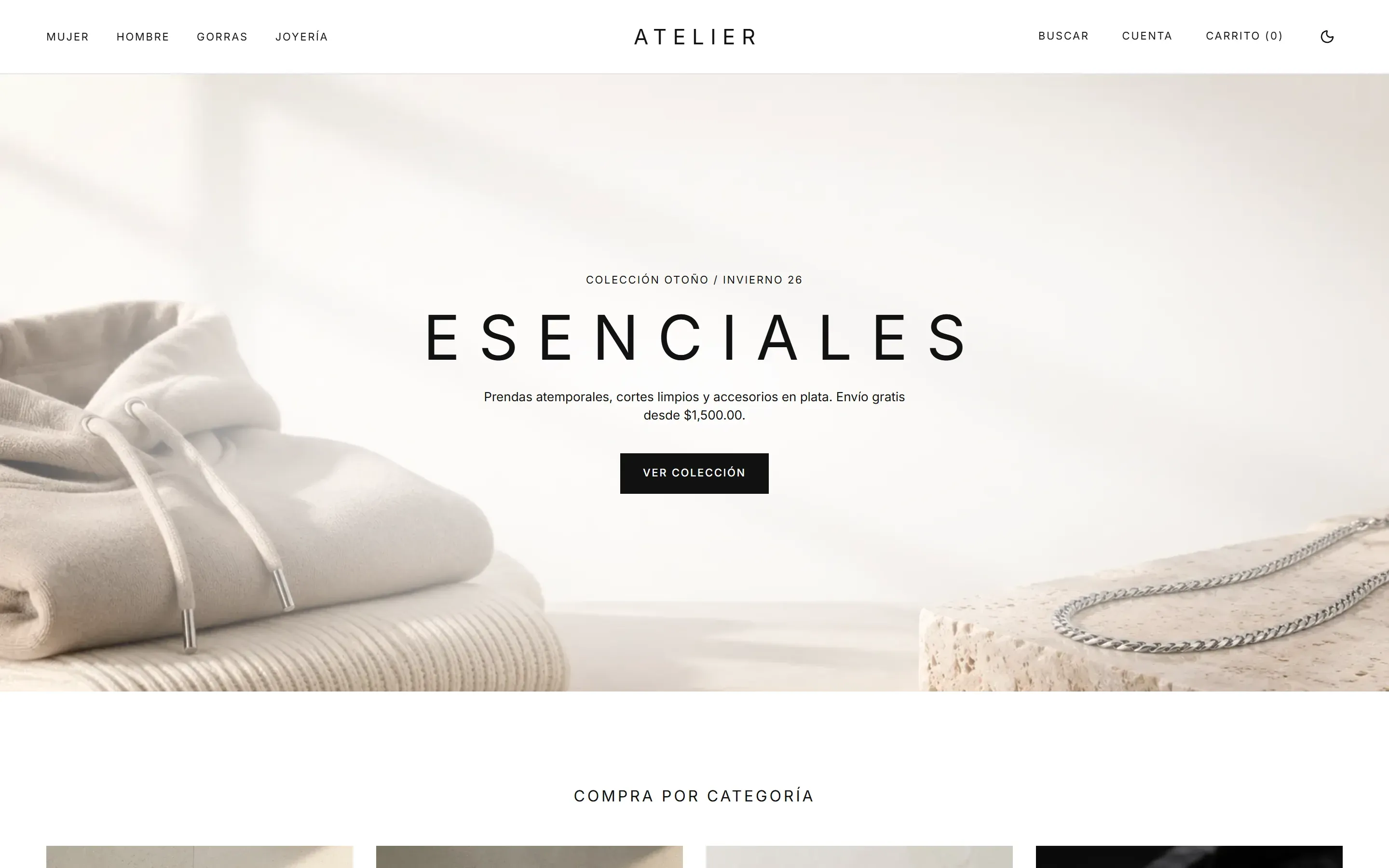
  • Project screenshot: Atelier

    Atelier

    An end-to-end online fashion store with a catalog, cart, Stripe payments and an admin panel for products, orders and sales.

    My role: UX/UI design in Figma, frontend, backend, database and payments.

    Personal project

    I built it to show how I design and develop a complete e-commerce store, from the interface to the payment method.

    • Figma
    • UX/UI
    • Next.js
    • React
    • TypeScript
    • Tailwind CSS
    • Prisma
    • PostgreSQL
    • Stripe
    Live siteAtelier (opens in a new tab)

Want your business to be next?

Message me on WhatsApp(opens in a new tab)

Case study · Vivero El Encanto

Project screenshot: Vivero El Encanto

Vivero El Encanto

An online catalog that already brings new customers to the nursery, and that the business updates itself without touching code.

At a glance

Client
Vivero El Encanto (Flornatec)
Industry
Growing and selling flowers and ornamental plants
Size
Mid-sized company, about 60 employees, in business since around 2000
Location
Atlixco, Puebla, Mexico
Date
October to November 2026
Project type
Paid client project
My role
UX/UI design, base design in Figma, frontend, SEO, GEO, security and photo editing
Team
Another developer and me, supported by AI (Claude).

Context

Vivero El Encanto is Flornatec's plant nursery in Atlixco, Puebla. For about 25 years it has grown and sold flowers and ornamental plants — poinsettias, tulips, hyacinths, marigolds, year-round plants and trees. It's a mid-sized company with about 60 employees, serving both families and businesses and events that buy wholesale.

Problem

Their previous website didn't work as a catalog, didn't lead people to contact the nursery, and every change depended on someone outside the business.

The client wanted:

  • An informative site where people could see most of their plants before visiting the nursery.
  • To serve their customers online.
  • To control their own website (which photos to upload, which season to show, which texts to change) without touching code.

My role

I owned the experience and the interface end to end, from the structure and base design in Figma to the frontend in production.

  • UX/UI design: site structure, paths to contact, and base design in Figma for desktop and mobile.
  • Frontend: every public page, components, mobile menu, page transitions, loading screen, filters and pagination.
  • SEO and GEO: technical and local SEO, structured data, and making the nursery discoverable by AI assistants.
  • Security and compliance: HTTPS, security headers, spam protection and privacy notice.
  • Photos: editing product and seasonal photos.

Process

  1. 1

    Understanding the business

    I reviewed the previous site and talked with the client about how they sell. The nursery works by seasons, so I organized the site the same way, with a catalog by season and plant type and whatever is in season always up front. We also defined the two most important actions for visitors, which are asking on WhatsApp and getting directions.

  2. 2

    Design in Figma

    I designed the base of the key pages (home, catalog and plant detail) for desktop and mobile, using the brand colors, green and red, and two typefaces, Young Serif for headings and Figtree for body text.

    Desktop

    • Wireframe · Home
    • Wireframe · Catalog
    • Wireframe · Plant detail

    Mobile

    • Wireframe · Home
    • Wireframe · Catalog
    • Wireframe · Plant detail
  3. 3

    Frontend development

    I built the site with Astro and reusable components (plant, season and fertilizer cards). On mobile, the menu opens as a tree of sections. There are smooth page transitions, a loading screen, and catalogs with color and pot filters, 24 plants per page.

  4. 4

    SEO, security and launch

    Before launch I ran a legal, SEO and performance audit of the site, fixed everything it found, and we published it on Hostinger.

Key decisions

  • Everything revolves around the season

    That's how people buy and how the nursery sells. The current season leads the home page, the menu and the catalogs.

  • WhatsApp as the main channel

    It's where customers already talk. There's a floating button on every page, "Ask about availability" on every catalog and plant, and "Get directions", which opens Google Maps.

  • Astro with server-rendered pages

    The site instantly shows whatever the nursery changes in its panel, without redeploying, and pages load with very little JavaScript.

  • Photos in several sizes

    Every photo is stored as WebP in three sizes, and phones download the small one, not the full one. In a plant catalog, images are the heaviest part.

  • Self-hosted fonts

    They load faster, and Google no longer receives each visitor's data.

  • Local SEO

    Structured business data with its location, breadcrumbs, a sitemap, and titles written for searches like "vivero en Atlixco".

  • GEO (AI search)

    An llms.txt file and structured data so ChatGPT, Gemini or Perplexity understand what the nursery is and can recommend it.

  • Security and data protection law

    Enforced HTTPS, security headers, spam protection on forms, a privacy notice under Mexican law (LFPDPPP), and explicit consent before publishing the photos people send to "Adopt a tree".

  • Online brochures

    The printed catalog can be flipped through on the site like a book and downloaded as a PDF.

  • An admin panel for independence

    From there the nursery changes photos, seasons, the carousel, texts and brochures, and replies to messages. Users have different permission levels.

Results

  • New customers from the website. The nursery told us that customers are already reaching out directly from the site.

  • An independent business. The nursery updates photos, seasons and brochures on its own, without asking anyone for changes.

  • Measured technical quality. 100 in SEO and Best Practices on every page measured, and 95 to 100 in Accessibility.

SEO
100
Best practices
100
Accessibility
95–100

Lighthouse (the engine behind PageSpeed Insights), home, catalog and plant pages on mobile and desktop · November 20, 2026.

Client testimonial

“I really liked how they worked: they met the deadlines, the design turned out exactly as I imagined, and they didn't stop at what I asked for; they brought extra improvements. What I value most is the admin panel: I can update the site myself without knowing anything about programming.”
— Client, Vivero El EncantoTranslated from the original in Spanish.

Desktop

  • Home page with the seasonal carousel
  • Poinsettia catalog: direct WhatsApp access, PDF brochure and filters
  • Plant page with photo gallery and direct WhatsApp access
  • All plants, with search
  • Seasons: the nursery's year, season by season
  • Brochure viewer: flip through the printed catalog on screen and download it as a PDF

Mobile

  • Home
  • Tree-style mobile menu
  • Seasonal catalog
  • Plant page

Stack

Design
Figma, photo editing
Frontend
Astro (server-rendered pages), TypeScript, CSS
Server and data
Node.js and MySQL; admin panel in PHP
Hosting
Hostinger
AI
Claude (Anthropic) as a development assistant
Repository
Private, by agreement with the client
  • Figma
  • UX/UI
  • Astro
  • TypeScript
  • CSS
  • SEO
  • GEO
  • Node.js
  • MySQL

Case study · Atelier

Project screenshot: Atelier

Atelier

An end-to-end online fashion store with a catalog, cart, Stripe payments and an admin panel for products, orders and sales.

At a glance

Project type
Personal project
What it is
Online store for clothing, caps and jewelry
Date
November 2026
My role
UX/UI design in Figma, frontend, backend, database and payments
Payments
Stripe in test mode, nothing is charged
Try it
Account cliente@example.com, password atelier-demo-2026, and card 4242 4242 4242 4242 (any future date and CVC)
Team
Personal project, built by me with support from AI (Claude).

Context

Atelier is a contemporary fashion store (clothing, caps and jewelry) that I built end to end as a personal project. It works like a real store, with a catalog, accounts, a cart, card payments and an admin panel. Products and orders are test data and Stripe runs in test mode, so nothing is charged.

Problem

An online store can't sell more items than it has, even when several people buy the last one at the same time. And whoever runs it needs to upload photos, adjust stock and track orders without touching code.

What I set out to do:

  • A complete store, not just a catalog: from the cart to payment and shipping updates.
  • Never sell more items than there are, even when several people buy the last one at once.
  • An admin panel to upload photos, edit stock, move orders forward and see sales without touching code.

My role

I built the whole project, from the design in Figma to launch, with Claude as a development assistant.

  • UX/UI design: Figma wireframes for the home, catalog, product page, cart, checkout, account and order detail.
  • Frontend: storefront with Next.js and React, filters saved in the URL, predictive search, zoomable gallery, a cart that persists, and light and dark mode.
  • Backend and data: PostgreSQL with Prisma, email or Google sign-in (Better Auth) and an admin role.
  • Payments: Stripe Checkout with stock reservation, a duplicate-proof payment notification, and release of abandoned payments.
  • Admin panel: products, photos uploaded straight to Cloudinary, sizes and colors with their own stock, orders and sales metrics.
  • Quality: automated tests, accessibility audit, SEO and performance.

Process

  1. 1

    Planning the store

    I defined the spec (modules, data model, payment flow and security) and split the work into phases, which were data, storefront, accounts, admin panel, payments, orders and launch. Each phase closed with the code checked and every test passing.

  2. 2

    Design in Figma

    I designed desktop wireframes in Figma for the key screens, which are the home, catalog, product page, cart, checkout, account and order detail.

    Desktop

    • Wireframe · Home
    • Wireframe · Catalog
    • Wireframe · Product page
    • Wireframe · Cart
    • Wireframe · Checkout
    • Wireframe · My account
    • Wireframe · Order detail
  3. 3

    The storefront

    I built the storefront with Next.js 16. The catalog filters by category, color, size and price, and the filters are saved in the URL so they can be shared. On the product page, picking a color only enables the sizes in stock. The cart persists between visits, and accounts work with email or Google.

  4. 4

    Admin panel and payments

    Next came the admin panel (products, photos, variants, orders and metrics) and Stripe payments. I tested the stock reservation and the payment notification against a real PostgreSQL database, with simultaneous purchases and repeated notifications.

  5. 5

    Quality and launch

    I checked accessibility with axe-core, measured performance with Lighthouse, set up SEO (metadata, structured data and a sitemap) and launched it on Vercel, with the database on Supabase.

Key decisions

  • Reserve stock before payment

    When checkout starts, the item is deducted with a single conditional operation in PostgreSQL. If two people ask for the last one, one gets it and the other is told right away, instead of paying for something that's gone. If they don't pay within 31 minutes, the stock comes back.

  • The server doesn't trust browser prices

    The cart only sends product and quantity. Prices, shipping and total are read from the database, and all money is handled in whole cents, with no decimals.

  • An order is marked paid only by Stripe

    Stripe's notification (webhook) is verified with its signature and each event is recorded only once, so a repeated notification doesn't duplicate anything.

  • A fallback for abandoned payments

    If Stripe's notification gets lost, a daily job checks expired orders and first closes the payment session, so nobody can pay for something whose stock was already released.

  • Two layers of permissions

    The admin role is checked inside every panel action, not just at the door. A test confirms that no action runs without that role.

  • Photos straight to Cloudinary

    The browser uploads photos with a permission signed by the server, limited to the product's folder. Then the server verifies the response and builds the photo's address itself.

  • Editing stock without overwriting sales

    If someone buys while the admin is editing stock, the panel flags the conflict instead of overwriting it.

  • A cached catalog

    Catalog pages are cached to load fast, and they update instantly when the panel or a sale changes the stock.

Results

  • Zero overselling. In the test, 20 simultaneous purchases go for the last item. One goes through, 19 are told it's sold out, and stock ends at 0. The test fails if the safeguard is removed.

  • Automated tests. 245 unit and component tests, and 31 integration tests against a real PostgreSQL database (stock, repeated payment notifications and expiry).

  • Accessible. Zero WCAG 2.1 AA violations (axe-core) across 36 pages and states, including the admin panel, on desktop and mobile. It can be used entirely with the keyboard.

  • Open demo. Anyone can buy with the test card and see their order under "My account".

Mobile performance
96–97
Accessibility
100
Best practices
100

Lighthouse (the engine behind PageSpeed Insights) on mobile, home, catalog and product pages, median of 5 runs · November 22, 2026.

Desktop

  • Store home page
  • Catalog by category
  • Filters by category, color, size and price, saved in the URL
  • Product page: only sizes in stock can be picked
  • Cart with a free-shipping bar
  • Dark mode
  • Admin panel: sales metrics (with test orders)
  • Admin panel: orders by status (customer details blurred)
  • Admin panel: order detail and shipping progress
  • Admin panel: photos per color and stock per size and color
  • Admin panel: home page images

Mobile

  • Home
  • Catalog
  • Product page
  • Cart
  • Metrics panel

Stack

Design
Figma
Frontend
Next.js 16 (App Router), React 19, TypeScript, Tailwind CSS 4, shadcn/ui and Zustand
Server and data
Prisma 7, PostgreSQL (Supabase), Better Auth and Zod
Payments and images
Stripe Checkout (test mode) and Cloudinary
Testing
Vitest, PostgreSQL in Docker, axe-core and Lighthouse
Hosting
Vercel
AI
Claude (Anthropic) as a development assistant
  • Figma
  • UX/UI
  • Next.js
  • React
  • TypeScript
  • Tailwind CSS
  • Prisma
  • PostgreSQL
  • Stripe

Education

Education & certifications

The academic foundation and the certifications that back my work.

Bachelor's degree

Engineering in Information Systems and Technology

Instituto de Estudios Universitarios (IEU)

In progress · expected Aug. 2027

Certifications

Interested in working together?

Message me on WhatsApp(opens in a new tab)

Experience

Career

Where I have worked and what I achieved at each place.

  1. —

    UX/UI Designer & Frontend Developer (freelance)

    Vivero El Encanto(opens in a new tab) · Atlixco, Puebla

    An online catalog that already brings new customers to the nursery, and that the business updates itself without touching code.

    • UX/UI design in Figma and the frontend of the entire public site in Astro.
    • Technical SEO, local SEO and GEO so the nursery shows up in search engines and AI assistants.
    • 100 in SEO and Best Practices on Lighthouse; 95 to 100 in Accessibility.
    • Figma
    • UX/UI
    • Astro
    • TypeScript
    • CSS
    • SEO
    • GEO

Looking for someone with this experience?

Message me on WhatsApp(opens in a new tab)

About me

One person, from design to code.

Portrait of Saul

I'm Saul Domínguez Torres, a full stack web developer and UX/UI designer based in Puebla, Mexico. I work with businesses that already do well, but whose website doesn't live up to what they offer.

Since I handle frontend, backend and design, you don't have to coordinate three people or explain the same thing three times: you talk to me, and what gets designed is exactly what gets built.

I use AI as support in my workflow — to research, prototype and review — and I hold certifications that back it up. It helps me move faster; the judgment, the design and the code quality are still my responsibility.

Three roles, one point of contact

  • Frontend
  • Backend
  • UX/UI

Details

Name
Saul Domínguez Torres
Location
Puebla, Pue., Mexico
Languages
Spanish (native) · English (intermediate)
Education
B.Eng. in Information Systems and Technology — IEU
Focus
Frontend · Backend · UX/UI
Download resume

Shall we talk about your project?

Message me on WhatsApp(opens in a new tab)

FAQ

What clients usually ask before we start.

Don't see your question here? Message me and I'll reply within 24 hours.

  • How much does a website cost?

    The final price depends on the scope of your project, but here is a reference:

    • Landing page or simple informational site: from $6,000 MXN. 1 to 3 pages, no admin panel. Ideal for a small business that just needs an online presence.
    • Multi-page site: from $12,000 MXN. With a contact form, multiple languages or animations.
    • Site with an admin panel and database: from $20,000 MXN. For businesses that need to update their own content without knowing how to code.
    • Online store or platform with built-in payments: from $35,000 MXN. Includes more development time and support.

    Quotes are always free, with no commitment.

  • How long does it take?
    • Landing page or simple site: 1 to 2 weeks.
    • Site with an admin panel and database: 3 to 5 weeks.

    The exact timeline depends on how quickly you send me the content and on the rounds of review.

  • How does payment work?

    The standard arrangement is a 50% deposit to start the project and the remaining 50% on delivery.

    For larger projects or bigger investments, we can add a payment halfway through (for example, 40% deposit, 30% at the midpoint and 30% on delivery) to spread the investment more evenly for both of us.

  • What do I need to have ready to start?

    Ideally your logo, the text and photos of your business. If you don't have them, I can help you get them or write them as an additional service (copywriting or stock photos), quoted separately.

  • Are the domain and hosting included? Do I own the website?
    • Hosting: basic hosting is included at no extra cost.
    • Domain: you pay for it and it's registered in your name (or your account), so it's always yours, even if you stop working with me. If it's more convenient, I can buy and set it up for you, but always in your name.
    • Ownership: the code and the website are yours once the payment is complete.
  • Can I update the content myself?

    Yes. For projects that need it, I build a simple admin panel designed for someone with no technical knowledge. It's included in sites with an admin panel and database (from $20,000 MXN).

  • Do you offer maintenance after delivery?

    Yes. I include 15 to 30 days of free support after delivery to fix any bug or issue with the site, meaning anything that doesn't work as agreed: a button that doesn't respond, a form that doesn't send properly or an image that doesn't load.

    It doesn't include new features, design changes or content that wasn't in the original project, such as a new section, an additional language or a feature that wasn't requested from the start. Those are quoted separately.

    If you want me to look after your site on an ongoing basis, I also offer a monthly maintenance plan or hourly adjustments, depending on what you need.

  • Will my website show up on Google?

    Yes. I build it so Google and AI assistants understand it well: fast loading, mobile-friendly, titles and descriptions based on what your customers search for, structured data and a sitemap.

    What no one can honestly guarantee is the top spot: ranking also depends on your competition, your reviews and time. Be wary of anyone who promises it.

  • Do you work with clients outside Puebla?

    Yes, I work with clients anywhere in Mexico and abroad. The whole process is remote: calls, WhatsApp and online deliveries.

Contact

Your business is already worth more than your website.

I'll make it look like what it really is. Tell me about your business and we'll figure out together what your site needs.

Message me on WhatsApp(opens in a new tab)

The fastest way to reach me.

Prefer to write at your own pace?

I reply within 24 hours.

I only use your details to reply to you. Privacy notice